
Introduction
Instagram has over two billion active monthly users, making it one of the most widely used social media platforms on the planet. Yet in any given month, a significant portion of those users are actively searching for how to delete their Instagram account — a number that has grown steadily as conversations around digital wellbeing, data privacy, and screen time have moved from niche concern to mainstream discussion.
The reasons people want to delete an Instagram account are as varied as the users themselves. Some are motivated by privacy concerns and a desire to reclaim control over how much personal data a major tech corporation holds about them. Others are stepping back from social media for mental health reasons, recognizing that the comparison culture and constant connectivity of platforms like Instagram can take a genuine psychological toll. Students, professionals, and parents often decide to delete an Instagram account as part of a broader effort to reclaim focus and reduce digital distraction. And some simply no longer find the platform useful or enjoyable and see no reason to maintain a presence there.
Whatever your reason, this guide will walk you through everything you need to know — the difference between deactivating and permanently deleting, exactly how each process works, how to download your data before you leave, and what to expect after the account is gone.
Deactivating vs. Permanently Deleting: Understanding the Difference
Before you delete an Instagram account, the single most important thing to understand is the difference between temporary deactivation and permanent deletion — because Instagram treats these two options very differently, and confusing them can lead to outcomes you did not intend.
When you deactivate your Instagram account, you are essentially hiding it. Your profile, photos, comments, likes, and follower list all become invisible to other users, but nothing is actually deleted. Your account and all its data sit in Instagram’s servers, waiting. The moment you log back in, everything is restored exactly as it was. Deactivation is reversible at any time with no action required beyond a standard login.
When you permanently delete an Instagram account, you are initiating a process that ultimately erases the account and all associated content from Instagram’s systems. This includes your photos, videos, story archives, messages, followers, and following list. Crucially, Instagram applies a 30-day grace period after you submit a deletion request — during those 30 days, the account is deactivated but not yet deleted. If you log back in at any point during that window, the deletion is automatically cancelled and your account is restored. After the 30-day period ends, the account and its data are permanently removed and cannot be recovered.
Choosing between these two options before you proceed is essential. If there is any possibility you might want to return to the platform, deactivation is the more prudent choice. If you have made a firm decision to leave Instagram for good, permanent deletion is the correct path — but make sure you have downloaded your data first.
Step One: Download Your Instagram Data Before You Leave
Before you delete an Instagram account permanently, downloading a copy of your data is a step that very few guides emphasize strongly enough — and it deserves emphasis here, because once the 30-day grace period expires, your data is gone and there is no way to retrieve it.
Your Instagram data archive includes everything the platform holds about you: every photo and video you ever posted, your direct messages, your stories, your comment history, the list of accounts you followed and were followed by, your profile information, and a range of metadata about your activity on the platform. For many people who have used Instagram for years, this archive represents a meaningful personal photo library and a record of conversations and connections they may want to preserve.
To request your data download, open Instagram and go to your profile. Tap the three horizontal lines in the upper right corner to open the menu, then tap Settings and Privacy. Navigate to the Your Activity section and look for the option to download or transfer your information. Instagram will prepare your data archive and notify you when it is ready — this process can take up to 14 days for large accounts, though most users receive their archive much sooner. The download arrives as a compressed file containing organized folders for each category of your data.
Taking this step before you delete an Instagram account ensures that you retain access to your photos, memories, and any information you might need or want in the future, regardless of what happens after the deletion is complete.
How to Delete Instagram Account Permanently: Step-by-Step
Instagram’s permanent account deletion process is handled entirely through a web browser rather than the mobile app — a design decision that likely reflects an intentional friction point to reduce impulsive deletions. You can access the deletion page from a mobile browser or a desktop computer.
Deleting Through a Web Browser on Desktop or Mobile
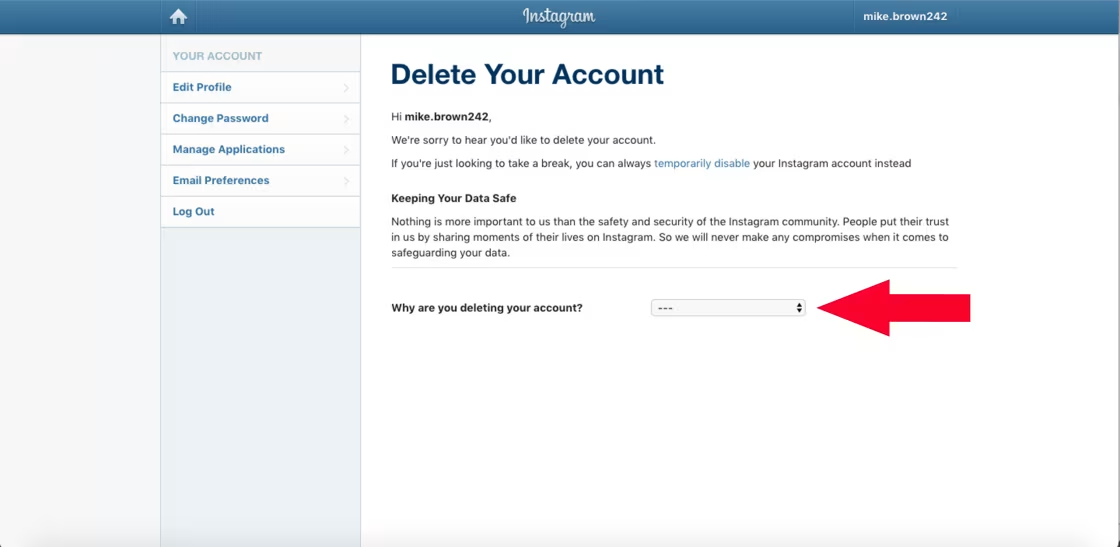
Open a web browser and navigate to Instagram’s official account deletion page at instagram.com/accounts/remove/request/permanent/. If you are not already logged in, you will be prompted to enter your username and password. Once logged in, you will arrive at a page that asks you to select a reason for leaving — Instagram uses this information for internal research, and you must select a reason from the dropdown menu before the deletion option becomes available.
After selecting your reason, you will be prompted to re-enter your password as a security confirmation. This step verifies that the person requesting deletion is the legitimate account holder and not someone who has gained unauthorized access. Once you re-enter your password and click the final confirmation button, the 30-day grace period begins.
During those 30 days, your profile is hidden from other users exactly as it would be during a voluntary deactivation. If you change your mind, simply logging into your account at any point during this window will automatically cancel the deletion request and fully restore your account. If you do not log in during the 30-day period, Instagram will permanently delete the account and all associated data once the period expires.
Deleting Through the Instagram Mobile App
Instagram has gradually expanded account management tools within the app itself. On updated versions of the app, you can find deletion options by going to your profile, tapping the three horizontal lines, selecting Settings and Privacy, then navigating to Account. From there, look for the option to deactivate or delete the account. The app will walk you through the same reason-selection and password-confirmation steps as the web process.
If you do not see a direct deletion option within your app, using the web browser method described above is the universally reliable approach regardless of your device or app version.
How to Temporarily Deactivate Your Instagram Account
If you are not ready for a permanent departure but want to take a break from Instagram, deactivating your account is the right choice. Deactivation achieves the primary practical goal — removing your presence from the platform and making your content invisible to other users — without the irreversibility of permanent deletion.
To deactivate, go to your profile in the Instagram app and tap the three horizontal lines to open the menu. Tap Settings and Privacy, then navigate to Account. Select the option to deactivate your account. Instagram will again ask you to select a reason and re-enter your password before the deactivation takes effect.
Once deactivated, your profile disappears from Instagram immediately. Anyone who visits your profile URL will see a message indicating the account does not exist. People who had you in their following list will find your profile gone, and any tags of your account in posts or comments will no longer link to an active profile.
Reactivating your account is as simple as logging back in. Your profile, followers, photos, and all other content will be restored exactly as they were at the moment of deactivation. There is no time limit on how long you can keep an account deactivated, though Instagram’s terms of service note that very long periods of inactivity may eventually result in the account being removed — making this primarily a tool for shorter breaks rather than indefinite suspension.
What Happens After You Delete Instagram Account?
Understanding exactly what changes after you submit a permanent deletion request helps you manage expectations and make an informed decision. The 30-day transition period is the most important thing to keep in mind — your account does not vanish the moment you click the delete button. It enters a holding state that is functionally identical to deactivation.
During those 30 days, other users who search for your username will not find your profile. Any content you shared — posts, stories, reels — will not appear in their feeds or explore pages. Your comments on other people’s posts will disappear as well. Direct messages you sent to other users remain visible in their inboxes, but they will appear as sent by a deleted account rather than your named profile.
After the 30-day period concludes and the permanent deletion is processed, your username becomes available for other users to register. Your profile URL will no longer resolve to any active page. All the data Instagram held about you — with the exception of certain categories that the company is legally required to retain for specific periods — will be removed from their systems according to their published data retention policies.
According to Instagram’s official Help Center, some information may remain in their backup systems for a limited period after deletion before being fully purged. This is standard practice across major technology platforms and is governed by Instagram’s privacy policy, which aligns with applicable data protection regulations including GDPR for users in Europe.
Privacy Considerations: What Instagram Knows Before You Go
The decision to delete an Instagram account often intersects with broader concerns about digital privacy — and it is worth understanding what Instagram collects and how that data is handled before, during, and after your departure.
Instagram, as a Meta platform, collects an extensive range of data about its users: the content you post, the accounts you interact with, the ads you view and engage with, your approximate location, your device information, and behavioral data about how you move through the app. This data profile is used to serve targeted advertising and to improve the platform’s recommendation systems.
When you delete your account, this data is ultimately removed from active systems, but the download archive you requested earlier remains in your possession. Understanding that you are taking back control of your own content — while also recognizing that some residual data may remain in backup systems for a defined period — is part of making a fully informed decision about your digital footprint.
For users particularly concerned about data privacy, the Electronic Frontier Foundation’s guidance on social media and privacy offers a helpful broader framework for thinking about what steps beyond account deletion are worth considering to protect your personal information across the web.
Alternatives to Deleting: What to Consider Before You Make the Final Decision
A permanent deletion is not the right choice for everyone, and it is worth spending a moment with the alternatives before committing to a decision that cannot be reversed after 30 days.
If your concern is excessive screen time or compulsive checking, Instagram’s built-in time management tools — including daily activity reminders and the ability to limit the time you spend in the app each day — may address the issue without requiring you to delete your account entirely. Similarly, muting accounts whose content you find stressful or unhelpful is a less drastic option than leaving the platform altogether.
If privacy is your primary concern, reviewing and tightening your account settings — switching to a private account, revoking data access from third-party apps connected to your Instagram, and limiting the personal information displayed on your profile — can meaningfully reduce your exposure without requiring you to leave.
If you are experiencing harassment or unwanted attention from specific users, Instagram’s blocking and reporting tools are designed to address exactly these situations without requiring you to delete your account. Instagram’s Trust and Safety resources are accessible through the Help Center and provide guidance on managing harmful interactions effectively.
Taking a week or two away from the platform through deactivation before making a final decision about permanent deletion is often a useful way to test whether the break itself solves the underlying issue, or whether you genuinely want to close the chapter for good.
Conclusion
Deciding to delete an Instagram account is a meaningful digital decision that deserves the same thoughtfulness you would bring to any significant choice about your personal information and online presence. Whether you are leaving for privacy reasons, mental health, productivity, or simply because you are ready for a change, the process itself is entirely within your control — and this guide has given you everything you need to execute it confidently.
To summarize the essentials: download your data before you do anything else. Decide whether temporary deactivation or permanent deletion better suits your situation. If you choose permanent deletion, use the web-based deletion page, confirm your reason and password, and allow the 30-day grace period to conclude without logging back in. After that, the account and its data will be permanently gone.
The ability to delete an Instagram account is an important expression of your right to control your own digital presence — and knowing exactly how to do it, fully and correctly, puts that control firmly in your hands.
FAQs
Is deleting an Instagram account permanent?
Yes — after the 30-day grace period concludes, permanently deleting an Instagram account cannot be undone. Instagram applies a 30-day waiting period after you submit a deletion request, during which the account is hidden but not yet erased. If you log into the account at any point during those 30 days, the deletion is automatically cancelled and your account is fully restored. Once the 30 days pass without you logging in, the account and all associated data are permanently deleted and cannot be recovered. If you are uncertain about leaving permanently, temporary deactivation is a safer first step.
Can I delete my Instagram account from the mobile app?
Yes, on updated versions of the Instagram app, you can initiate account deletion by going to your profile, tapping the three horizontal lines, selecting Settings and Privacy, then navigating to Account options. If you do not see the deletion option within your current app version, the universally reliable method is to open a web browser — on your phone or a computer — and navigate directly to instagram.com/accounts/remove/request/permanent/. The web method works on all devices and all account types regardless of app version.
What happens to my photos and content after I delete my Instagram account?
After the 30-day grace period expires, all your posted photos, videos, reels, stories, comments, likes, and follower/following data are permanently deleted from Instagram’s active systems. Your username also becomes available for other users to register. This is why downloading your data archive before initiating deletion is strongly recommended — it is the only way to retain copies of your posted content after the account is gone. Instagram notes that some information may remain in backup systems for a limited additional period before being fully purged.
What is the difference between deactivating and deleting an Instagram account?
Deactivating an Instagram account temporarily hides your profile and content from other users without deleting anything. Your account can be fully restored simply by logging back in, with all content, followers, and settings intact. Permanently deleting an Instagram account removes all content and data after a 30-day grace period, and cannot be reversed once that period ends. Deactivation is ideal for taking a break while keeping the option to return. Permanent deletion is the right choice when you have decided to leave Instagram for good and have already downloaded your data.
How long does it take for Instagram to permanently delete an account?
After you submit a permanent deletion request, Instagram applies a mandatory 30-day grace period before the deletion is actually processed. During this period, your account is hidden from other users but not yet erased, and logging back in at any point cancels the request and restores the account fully. After the 30-day window closes without any login activity, Instagram processes the permanent deletion. Some residual data may remain in Instagram’s backup systems for a further limited period according to their data retention policies, but the account itself and all actively accessible data will be permanently gone.